I love Claude. I love ChatGPT. I use Gemini too. All three, for work. But at the end of the month, the bills arrive. Like a relative who comes for a day but doesn't want to leave.
For office work, its fine. But for my personal stuff? My open source projects, homelab setup, random late-night experiments. Paying for every token felt wrong. Especially when I have good machines with decent hardware.
So I wanted a local LLM. On my own machine. No meter running in the background.
I tried. Many times. I tried Cline, Openclaw, etc. I tried a bunch of other tools I don't even remember now. Every time, same story. Either the tool froze. Or the model told me things that were not true, with such confidence. I felt like talking to an uncle at a wedding about crypto. Honestly, I gave up. More than once.
Then came Cindy
I follow theAI Weekly newsletter. The last issue mentionedCindy. An open-source AI agent that "works out of the box." I have heard "works out of the box" before so many times that I am no longer amazed to find the box empty now. So, I tried it anyway. And this time, something was different.
A little about Cindy. Its open source, Apache 2.0. It runs on your own machine and works with your real files. You can bring your own model, including a local one. That last part was all I needed to hear.
Then I read the tagline. "Consider it done." Wait. I have heard this before. If you did engineering in Pune, you have too.Syntelused "Consider IT Done" for years. Capital IT, of course. Besides, Syntel and Cindy sounds same too 😀. Cindy's tagline is "Think it. Consider it done". So I got it setup.
On the login screen, chooseSkip Sign-In. This runs local agents. No Cindy account needed.
Point Cindy to the local Ollama model.
What did I use it for?
I have a homelab. A Kubernetes cluster. A monitoring stack. A few hobby apps. Earlier, I used Claude and ChatGPT to keep an eye on them. Now I asked Cindy simple questions:
Which pods are not running? Did anything restart recently?
Is my monitoring actually monitoring, or just sitting there looking pretty?
It also did some administration jobs for my SSHing to baremetals and monitoring processes, setting up cron etc.
Some internet research and documentation bit. Yet to try programming.
And here is the surprising part. It does not make things up. When a pod was down, it said the pod was down. When all was fine, it said all was fine. No imaginary CrashLoopBackOff for extra drama. I don't know the exact secret sauce. My guess? Cindy behaves like an agent. It checks real output instead of guessing from memory. Whatever it is, somebody engineered it well.
Let me not oversell. It is slow. Claude and ChatGPT reply in seconds. A local 30B model takes its time. Sometimes I make chai while it thinks. But I don't mind. For my homelab, speed is not the goal. Accuracy is. I would rather wait two minutes for a correct answer than get a wrong one in two seconds.
Next stop: Linux
Mac is sorted. Next, my Linux machine. Cindy has a properLinux guide. Ubuntu 22.04 and 24.04 get an official .deb through apt. Arch-based systems get a one-line install, as your normal user. It can be a bit tricky. I am going to try this on Manjaro(Yes, I know Manjaro is not real Arch).
Feel free to try this and let me know how it works for you.
I've been working in DevOps for around 14 years, and I've also been teaching DevOps and Cloud subjects at universities for the last 4–5 years.
One thing I've noticed recently: getting your first DevOps job seems much harder than it was even 2–3 years ago.
A few years back, students and juniors would send me their CVs and I'd usually have something useful to suggest. Many of them would at least get interview opportunities.
Today, the market isn't great, and on top of that, everyone has access to AI-generated CVs, cover letters, LinkedIn profiles, and so on. When hundreds of applications all look polished, it becomes harder for recruiters to figure out who actually knows their stuff.
So here are a few things I keep telling my students.
1. Don't Choose DevOps Because You Think You Can Avoid Coding
I've heard this quite a few times:
"I'm not interested in coding, so I'm thinking of DevOps."
That's the wrong reason to get into DevOps.
You'll write scripts, automation, YAML, pipelines, Infrastructure as Code, debugging tools, and sometimes proper application code. More importantly, you need to enjoy investigating systems and figuring out why something isn't working.
If you hate both coding and troubleshooting systems, DevOps probably isn't the escape route you're looking for.
2. DevOps Comes With Responsibility
Remember Spider-Man?
"With great power comes great responsibility."
That applies surprisingly well to DevOps.
The infrastructure you're managing might be running someone's entire business. Sometimes you're having dinner with your family and an alert appears on your phone. Sometimes something breaks at an odd hour. Sometimes everyone else is enjoying a holiday while you're wondering why a production node suddenly decided it no longer wants to participate in society.
Not every DevOps job has terrible on-call expectations, of course. But ownership and accountability are part of the profession. Know what you're signing up for.
3. Build a GitHub History, Not Just a GitHub Account
When I started 13–14 years ago, having an impressive GitHub profile wasn't nearly as important for many infrastructure roles.
Today, if you're a student with no professional experience, your GitHub can become evidence that you actually build things.
Don't obsess over making every project impressive. First build the habit of creating things regularly.
Write scripts
Build Docker images
Automate something with Python
Create Terraform modules
Write an Ansible role
Deploy Kubernetes applications
Build CI/CD pipelines
And commit your work.
I actually suggest turning this into a game.
When I was in school, some friends and I wanted to improve our English. We made a game where we had to speak English all the time — if someone caught you speaking another language, you lost points. We did this for years, and it genuinely helped.
Do something similar with GitHub.
Find a friend. Every day you commit something meaningful, you get a point. First person to 100 wins. Then reset and start again.
You'll miss days. You'll get bored. That's fine.
But after a year, compare your GitHub profile with the one you had before.
4. Stop Sending the Same Application to 500 Companies
AI has made mass-applying ridiculously easy — which also means everyone can do it.
I'd rather spend proper time on 10 jobs I genuinely want than blindly apply to hundreds with the exact same CV and a generic cover letter.
Read the job description. Understand what they're actually asking for. Then explain why your experience and projects match those specific requirements.
Quality over volume, every time.
5. Don't Just Ask AI to Write the Entire Cover Letter
Use AI to proofread it, improve it, or organize your thoughts if you want.
But put yourself into it.
Mention something specific from the job description. Explain a relevant project. Explain why you're interested in this particular role.
It's okay if your writing isn't perfect. I'd personally rather read something that sounds like a real person than another perfectly formatted:
"I am thrilled to apply for the exciting opportunity to leverage my passion for innovative cloud-native solutions..."
You know the type.
6. Add Something Human to Your Application
One thing worth experimenting with: a short Loom or video introduction.
Not 10 minutes. 60–120 seconds.
Something like: "I know you're probably reviewing a lot of applications, so instead of making you read another long introduction, here's a 90-second video about who I am, what I've built, and why I'm interested."
Whether recruiters watch it is another question. But at least you've given them another way to evaluate you — something that's genuinely hard to fake with AI.
7. Make It Clear You're Willing to Prove Your Skills
When appropriate, mention that you're happy to go through a technical evaluation or practical exercise if that's part of their process.
For someone without much professional experience, being able to show what you can do can be far more useful than another paragraph claiming you're "passionate about DevOps."
None of these are magic tricks.
They won't guarantee an interview, and they definitely won't guarantee a job.
But the way people apply for jobs has changed dramatically with AI. If everyone's CV looks good, simply having a good-looking CV isn't much of a differentiator anymore.
Build things. Show your work. Develop consistency. Personalize your applications. Give people evidence that there's an actual engineer behind the PDF.
Curious what others think — especially people involved in DevOps hiring.
Has the way you screen junior DevOps candidates changed over the last 2–3 years?
Last week I went toMeasureCamp Delhi 2026. This was their 200th event and indeed a special one. Before going, I had a simple picture in my head. Rows of chairs. A stage. Some speakers talking. Us nodding along. Chai/Coffee in between. Maybe a goodie bag at the end. People looking to sell their product every now and then. Group of students clicking selfies all over. The standard conference deal we have all attended at least fifty times in our careers.
I was wrong indeed.
MeasureCamp is something called an "unconference." When I heard the word for the first time, I thought maybe they forgot to plan the conference part. It was on purpose though. There is no fixed agenda. The event starts with a short intro, sponsors get their thank you, and then they show you a big blank board with time slots and room numbers. That board is the real hero of the day. Here is a picture:
Speaker/Event Session Board
I remember pre-covid days, I did something similar. As a meetup organizer at DevOps Pune and after getting some inspiration Seattle meetup groups, I started working onLeancoffeeformat of meetups since we were getting lot of marketing pitches back then. Here is what Leancoffee is. Definition copies as it is from their site.
Lean Coffee is a structured, but agenda-less meeting. Participants gather, build an agenda, and begin talking. Conversations are directed and productive because the agenda for the meeting was democratically generated.
So I now assumed this Unconference was probably the same, with a new name. But again, I was wrong.
Here is what happens. If you want to speak on something, you write it on a small card, stick it on the board, and boom, you are now a speaker. No approval committee. No forms. No "we will get back to you." If people like your topic, they walk in. If they don't, you get a very empty room and a good lesson in humility.
Only one rule was strict. No pitching your company. Sponsors already pay for that privilege, so the rest of us just talk shop, not sales. Once that rule was set, every conversation in the building felt honest. Nobody was secretly selling you a subscription while pretending to chat.
Wow! It sounded good and scary at the same time. Good, because
This was different. A different learning experience is always good.
No marketing pitches. As an organizer, I know how bad this can get.
I could choose who and what I want to listen to.
So many good topics being displayed and so much to learn.
Scary because:
Embarrassment of not having any audience if you end up becoming a speaker.
Fear of missing out on good speakers if multiple good events go in parallel.
My colleagueRohan Deshpandeand I went there just to attend, representingConvert.com, nothing more. No plan to speak, no slides, nothing prepared. But after the opening session, we looked at the board, looked at each other, and thought, why not? We put up a session on how AI has been sneaking into troubleshooting and internal workflows at CRO and A/B testing companies. Basically the stuff we have been quietly doing for months.
We kept it in a very informal discussion format. In fact, I sat down with the attendees just facing them. More like a group chat than a lecture. About 15 to 20 people joined. And the questions came fast. Do you actually trust AI's calls or are you just being brave? Where is this going for testing platforms? Personalization, traffic tracking, integrations with tools people already use daily. People were genuinely curious, not just polite.
Best part of the whole day, honestly. We did not plan to speak, did not prepare a single slide, and still walked away with speaker mementos. Somehow that felt more earned than if we had rehearsed it for a week.
This time the turnout was around 120 plus people. I think they expected more, but Delhi was also hosting the BRICS summit that same day, so a lot of people probably got stuck in traffic or security barricades instead of analytics discussions. Still, seven breakout rooms ran side by side the whole day, and people moved between rooms freely, following their curiosity, not any fixed schedule.
I also sat in on a few sessions myself. One on attribution problems in ads and CRO. One on moving from GA4 to Amplitude. One on data governance and AI. And one with a title that stuck with me, "How Data Lie." Every session was run by someone actually doing the work, not someone presenting a fancy case study made for likes.
But if I am honest, no single session was the best part. The people were. I met folks from Amplitude, founders running their own analytics platforms, and CRO experts who have worked with some really big consumer brands. Normally this kind of networking takes weeks of cold emails and LinkedIn requests that nobody replies to. Here it happened in five minutes near the coffee counter.
This was also the 200th MeasureCamp Delhi event, which is no small number. A big thank you to the organizers and volunteers who pulled this off. Running an unconference sounds easy on paper, "just let people talk," but making that chaos actually work smoothly takes real effort. They did a solid job. Thank you so much for all the work.Tanmay GargPriya DhimanAnuj B.Abhishek DeswalSorry if I missed anyone here.
If you work anywhere near analytics, data, or experimentation, and you have never been to a MeasureCamp, go once. Go with zero expectations. That is honestly the whole point.
Every engineer knows this problem. You switch jobs after a year and a half, sit down to update your CV, and go completely blank. What did I even do all this time? You worked hard, you know you did, but the specifics have evaporated.
That's exactly what happened to me after my first job switch. I worked in a small company, so it wasn't like I had ten different clients with ten different stories to tell. Just one job, multiple responsibilities, and somehow none of it stuck in memory when I needed it most.
So I built a habit. Nothing fancy. Just an Excel sheet. Date, what I worked on that day, two or three lines, status: in progress or done. That's it. No fancy tool, no elaborate system. Just discipline.
It worked exactly as intended. Next time I job-hopped, I knew precisely what I'd built, what I'd learned, what to put on the CV. Simple win.
Then one day, the habit paid off in a way I never expected.
I was the only other DevOps engineer besides my boss, who lived in a different time zone. Over a phone call, he asked me to delete a list of S3 buckets, unused, just sitting there costing money. I did it. And because I'd made note-taking a daily habit by then, I logged it too: deleted these buckets, told they were unimportant.
A few weeks later, the engineering team noticed a monthly report had stopped generating. Nobody knew why. My boss dug in during his hours and found that an important S3 bucket was gone. No CloudTrail back then, no audit log, no way to trace who did what. And it wasn't just the two of us with AWS access, several people in the company had it.
When I came online, he asked me to investigate. I went straight to my Excel sheet. There it was, dated weeks earlier: deleted those buckets, was told to.
That log ended the mystery in minutes. We knew exactly what happened, when, and why. It was human error, not a hack, not malice, just a bucket that should never have been on that delete list. My boss also gave me an important lesson that day: being told to do something doesn't mean you skip verifying it yourself. As a DevOps engineer, that judgment call is on you too.
But the real hero of that day was a habit I'd started for a completely unrelated reason: keeping my CV honest.
I kept that habit for years after. What began as a fix for a bad memory turned into something closer to a safety net. You don't always know which note you write today will matter six months from now. Sometimes it's just for your CV. Sometimes it's the only thing standing between "human error" and "we have no idea what happened."
So here's my question to you: do you keep any kind of daily work log? Not for performance reviews, not because someone told you to, just for yourself. And if you don't, after reading this, would you start?
I still remember the date almost. Not exactly, because it's been years. But I remember it was a Friday. I remember it was IPL season. And I remember I had a ticket in my pocket for my first ever live cricket match.
I was an intern back then. QA team. I'd been handed a project because I "liked Linux." That's it. That was my entire qualification. I'd played around with LAMP stacks, set up WordPress a few times, run enough commands to feel dangerous. So when they needed someone to set up a QA environment for a PHP application, my name came up.
Simple task, they said. Get the environment running. Make it accessible. Client's in Australia, they need to see it live if things go wrong.
Nothing about that sentence was simple.
The Setup From Hell
I started with VirtualBox, because that's what I knew. My boss shut that down immediately. Had to be AWS. Public URL. Client access.
New OS setup. New cloud platform. New tool called Composer that I'd never touched. I did what every self-respecting engineer with no documentation does: I Googled my way through it.
Every install hit a wall. Every wall meant a new Jira comment. Developers would reply with fixes: use this version, open this port, set the database up like this. I'd write it all down on a random notepad. Spin up a new instance. Try again. Snapshot everything because god forbid I lose progress. Scrap the instance. Repeat.
Three weeks of this. Three weeks of two steps forward, one step into a wall.
The Comment That Ruined My Friday
Mid-day, that Friday, I saw it. A comment on the ticket from the client. Something like "not happy with the delay."
As an intern, that hits different. You don't have the thick skin yet. I read it and felt genuinely sick.
I made a decision right there: I'll fix this today. Match or no match.
6 PM came and went. 6:30 too. Office was emptying out. I was still at my desk, notepad open, trying combination number forty of the same setup.
That's when my boss's boss walked past. Not my direct manager, the guy above him. Saw an intern still sitting there at that hour and got curious enough to ask what was going on.
I showed him the comment. Told him I couldn't crack the setup.
The Question That Changed Everything
He sat down next to me. We started fresh, new instance, working through it together. At some point he noticed my notepad, full of scribbled notes from old chats and Jira threads.
"What's this? Who gave you this?"
I explained. Historical Jira comments, cobbled together over three weeks.
Then he asked the question I should have asked myself on day one:
"Do you not have documentation for this setup? Surely someone who built this environment before has notes. Did you ever ask?"
I hadn't. It genuinely hadn't occurred to me that documentation was something you could ask for. I thought my job was to figure it out, silently, on my own, because asking felt like admitting I wasn't good enough.
He looked at me and said something I've never forgotten: learn to say no, or learn to ask for help, when you need it. You're an intern. You're not the highest paid person in the room. Nobody expects you to know everything. But dragging on for three weeks because you were too afraid to ask a question? That helps nobody.
The Email
We tried the setup a couple more times together. Then we did something I hadn't thought to do in three weeks: we wrote an honest email to the client. Explained the real story. No documentation had ever been shared. No process existed. That's why this dragged on, not because anyone was slacking.
We left the office around 10 PM. I walked out past people who'd already watched their match and were heading home. My ticket was still sitting unused in my bag.
I won't lie, I was gutted about the match. But I was also carrying something heavier than disappointment. I'd learned something that had nothing to do with Linux or AWS or Composer.
The Payoff
Next morning, a full documentation package landed in my inbox from the ops team on the other side. Turned out it existed all along. Nobody had thought to hand it to an intern, and I'd never thought to ask.
With that doc in hand, I set up the entire environment in one shot. Automated it with a shell script right after, just so nobody after me would have to go through what I did.
Why This Still Matters
That lesson didn't stay in that internship. Years later, at a different company, a server went down and the CEO's email landed straight in my inbox asking what DevOps was doing about it. I told him straight: DevOps isn't magic. Some things need process, not miracles. That confidence to say it plainly came from that Friday night.
Since then, I've made it a habit. If I know the answer, I say yes upfront. If I don't, I say so, without the fear of looking incapable. That fear is expensive. It cost me three weeks and a cricket match. It doesn't need to cost you anything if you learn the lesson early.
So here's the takeaway, for every intern, every junior engineer, every person new to a team: ask for the documentation. Ask for help. Say no when you need to. Nobody's going to think less of you for it. If anything, they'll respect you more for not wasting three weeks pretending you have it figured out.
I missed a cricket match to learn that. You don't have to.
Let me take you back to 2012. I was young, curious, and had just been handed the keys to a Nagios server. One server, a handful of clients. Nothing fancy. Just config files, cron-like discipline, and a dashboard I had to check every single morning like it was my first cup of chai.
That daily ritual taught me something no course ever could. Logging in, scanning the trends, noticing when something looked "off" before it became a full-blown crisis. Disk filling up because some user decided the server was their personal Dropbox? Caught it. CPU spiking for reasons nobody could explain? Went hunting for the process before it became a 2 AM phone call. This wasn't fancy AIOps. This was just paying attention, the old-fashioned way.
Every new server that got provisioned, I added to Nagios myself. Every new process, I wrote a check for it myself. There was no abstraction between me and the machine. If something broke, I knew exactly why, because I built the thing that was watching it.
Then I moved organizations, and Nagios grew up with me. Suddenly it wasn't one server and a few clients, it was a clustered setup monitoring 5,000 servers. A team of 10 DevOps folks, SaaS tools watching Nagios itself (yes, we had to monitor the monitor), and Icinga entering the picture as the better-looking cousin of Nagios. That's when things got serious.
This is also where I learned Nagios could do more than just "is the server alive." We started writing bash scripts and plugging them in to parse logs, actual business logs, to generate reports for sales and marketing. Number of deals closed, tracked through log monitoring. When those reports failed, guess who had to debug the script at odd hours. Character building, as they say.
I last touched Nagios seriously about two years ago, mostly for bare metal setups. Since then, I've worked with Prometheus, New Relic, Zabbix, the works. And they're good. Genuinely better dashboards, better scaling, better everything on paper.
But here's the thing nobody tells you about Nagios: it keeps you rooted to the system. You're not looking at pretty graphs from a distance. You're inside the OS, understanding processes, permissions, disk layouts, the works. When I automated Nagios setup with Ansible and later with Fabric in Python, things broke constantly. And every time they did, it was my old shell scripting instincts and my bare-metal Nagios days that bailed me out. That knowledge doesn't come from reading a Prometheus exporter's YAML file. It comes from getting your hands dirty.
I recently came across a blog from another engineer reminiscing about Nagios, and it hit me that I'm not alone. There's a whole tribe of "Nagios oldies" out there who get it. We know the newer tools are shinier. We use them daily. But there's something about Nagios that built our fundamentals in a way nothing else quite has.
Better monitoring tools may exist. But Nagios will always be the one that taught me how to actually understand a server, not just watch it.
I saw a video a while back about old Disney animation and how they fooled viewers in the last couple of years. Same character movements, reused frame by frame, across completely different characters and different movies. Different faces, different worlds, same underlying motion. It worked for years. Nobody noticed, or nobody cared, because the backgrounds and story kept changing enough to sell it. Here is thevideoI am talking about. This was deliberate for many reasons as you read more about it, you will know. Some reasons, I understood were, nostalgia, saving time or maybe laziness too.
I didn't think much of it until I saw the same thing happening with AI.
I was working on generating some images recently. I kept feeding new context, new prompts, expecting newer results. The first couple of images were just fine. Then I started noticing a pattern of same poses, same layouts, same compositions repeating underneath a different backdrop. Not identical, but close enough that it felt like the AI found something that worked and decided to stop being creative.
I told myself, okay, maybe that's fine for images. Then I tested it on something that mattered more.
I use AI sometimes to teach certain concepts to my kid. I asked AI to write a short story. It was about living and nonliving things. It came out lovely. She enjoyed it, I enjoyed it. All good, right?
The next day, I asked for a story about vertebrates and invertebrates. Same structure. Same pattern with just a bit offind and replacemay be 😀. Practically the same story with a few words swapped out. If I had outsourced that to a person and gotten this back, I wouldn't have accepted it. And here's the thing, my kid is five. Even she would note this eventually. Kids get bored of the same story wearing a different costume faster than we think.
Now this is not about things impacting my personal work. The part that actually worries me isdocumentation.
I use AI heavily for documentation and writing. And I've caught the pattern there too. Same structure repeating article after article, same phrasing patterns, same rhythm, regardless of what the topic actually needs. It's probably efficient. But it's also lazy. And I worry people will lean onto this instead of catching it, hand AI a rough context, ask for a full end to end document, and publish whatever comes back without questioning why every article somehow reads the same.
Here is what I found being the technical reason to be. This comes down to how models pick outputs. They default to the highest-probability path unless you push them elsewhere, so once a structure works well in one response, it becomes the easy option for the next, especially in the same session where earlier context keeps shaping what comes after. Lower temperature and conservative sampling, which most tools default to for reliability, make this worse on purpose. It's not laziness the way we mean it. it's optimization doing exactly its job: minimize risk, maximize consistency.Creativity was never the objective. Which is exactly why the paragraph-by-paragraph, keep-pushing-back approach works, it forces the model off the safe path it would otherwise default to.
When I see this happening, here's what works for me instead. Don't ask for the whole thing to be written or documented at once. Go paragraph by paragraph. Feed fresh context deliberately every time. Question, Argue and provide newer/better context every time. And at any time something feels repeated, say so. Tell it directly. That nudge matters more than people think, it's not just fixing one document, it's teaching the model what you don't want. Some would comment and ask to create a new session for improvement here. I agree with it, but how I and sometimes even you may work, sometimes we need the session memory to exist for various reasons, so we use the same sessions for a long time.
Disney may have eventually moved past reusing the same animation cycles. Or even if they re-used some, they had some valid reason like ‘nostalgia’. They could have even stopped doing this because audiences quietly noticed this and started expecting more, and also maybe that the reused motion stopped being good enough. I think we're also at the exact same point with AI generated content, whether that's documentation, images, or bedtime stories. It'll get away with repeating itself for a while. Until the audience notices. And audiences always notice eventually, even five year old ones will.
So if you're using AI for content, don't just accept the first draft's texture as final. Push it. Ask it to genuinely think differently, not just swap a few nouns. Creativity isn't AI's job to protect. It's ours.
Yes, I know how that sounds. Documentation about documentation about documentation. Somewhere an intern is crying. Actually that's the phrase that hit me mid-conversation yesterday.
In DevOps we talk about monitoring the monitoring system. You don't just set up alerts and walk away. You watch the watcher too, because if your monitoring breaks silently, you find out the hard way. We handle it mostly by using a 3rd party monitoring Saas tool or a completely different monitoring tool that is on a different infra to monitor our monitoring. Many a times, we also setup multiple monitoring tools to monitor each other.
Turns out documentation has the exact same blind spot, that I realized yesterday.
Here's the problem. Documentation itself isn't static, but the system around it should be. A proper guideline of how the docs should look consistent across.
Think about what happens with two or three writers on the same knowledge base.
One person is deeply technical, every article turns into a dense reference doc.
Another writes for humans first, simple language, easy to follow, but a senior engineer might find it too light.
A third writes in a fun, engaging tone that people love reading but that doesn't actually answer the question they came for.
None of these people are wrong. But put them in the same wiki with no shared rules, and the documentation stops looking like one system. It may end up looking like three different people arguing.
That's what documenting the documentation fixes. Not the content. The structure around the content. Heading formats. Whether an index is required. How many bullets before it's too many. Screenshot rules, including the boring but important one, don't reveal internal or customer details in a screenshot(Nothing says 'security incident' like a screenshot where someone forgot to close the tab with the customer PI sitting right there). Whether emojis are fine or banned. Which kinds of diagrams are expected. Small decisions, but decided once, so nobody has to reinvent them article by article. Is humor ok. How much humor is ok? Procedure to build the context, etc.
Two things break without this:
When someone leaves the team, whoever replaces them has nothing to stand on. No rulebook, no shared style, just vibes and old examples to guess from.
Even with the rules written down, you can't assume people will keep following them. Rules you hand someone on day one quietly erode by month six. Rules handed over on day one have a shelf life shorter than office milk.
So the system needs an audit layer too. Not a one-time handoff. A recurring check.
This is where it gets easier than it used to be. You write your rules once, in something like aCLAUDE.md, plain and specific. Then you let AI do the boring, repetitive part; scan every new article, and periodically scan the old ones too, and flag anything drifting from the standard. Wrong heading structure, missing index, a screenshot that shouldn't be there, tone that's drifted too casual or too dense. The AI doesn't decide what's true. It checks what's consistent. Humans still review before anything changes.
Monitoring the monitoring system caught on in DevOps because someone finally said the obvious thing out loud, watch your watchers. Documentation needs its own version of that sentence.
Document the documentation. Then audit it like you mean it.
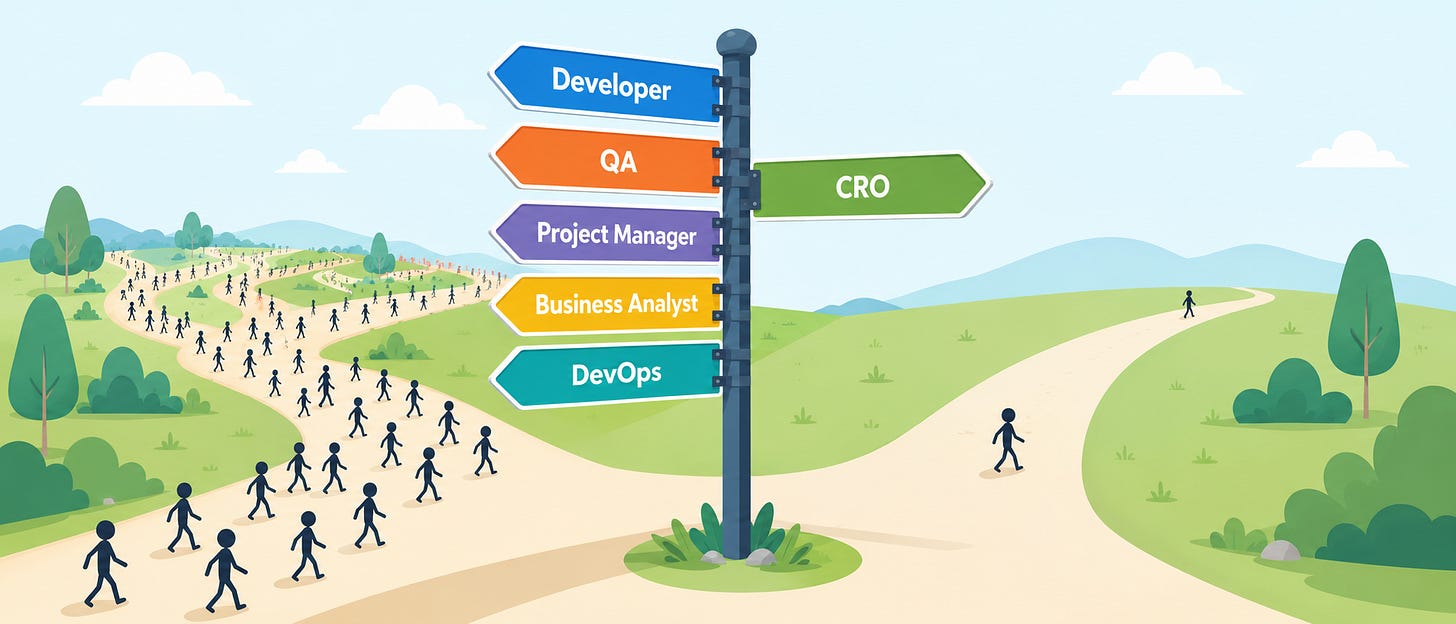
When I ask any of my student what they want to be? I mostly get one of the five answers: Developer, QA, Project Manager, Business Analyst, and now DevOps too.
Nobody says “CRO”, because nobody knows it exists. A few years ago, this was the state with DevOps too :)
What Is CRO?
Conversion Rate Optimization. The job to figure out why people visit a website and leave without buying, signing up, or clicking the button, and then fixing it. Not by guessing but by testing, perhaps even by some coding.
Here’s what you already know.
Dev builds the product.
QA makes sure it doesn’t break.
BA figures out what the business needs.
CRO figures out why real humans aren’t doing what the business hoped, and runs experiments to fix it. With lots of tools again.
Tech, psychology, and data, all in one job.
Classic one: “But I’m Not Great at Coding”
If you don’t want to code at all. Stop reading here. Some coding will always be needed in all tech. But Relax! You don’t need DSA or LeetCode for this. What actually helps here is:
Basic HTML/CSS, enough to know what “move the button above the fold” means. You learn this mostly in the initial classes, of course I am making some assumptions here.
A little JavaScript, enough to talk to developers and state some requirement. Better if you could do it yourself.
Comfort with numbers, enough to know 40% improvement means nothing if only 20 people saw it. Some exposure to good tools like Google Analytics.
That’s it. CRO rewards curiosity about human behaviour, not coding depth.
A Day in CRO
Look at heatmaps. Watch session recordings of real users struggling. Check analytics reports. Understand human behavior. Form a hypothesis. Run an A/B test. Wait patiently (no declaring winners on Day 2). Read the results honestly. Tell a non-technical team what it all means.
Partly a detective work, partly experiment design and most part is communication.
Why Should you do This
All freshers applying for a dev role are competing with a thousand others who did the same DSA course and built the same to-do app. CRO is comparatively empty. Businesses don’t jsut need hi-tech people, they also need a mix of both who get the tech and the human side of a website, and almost nobody of your age is positioning for it yet.
Bonus: skills from Dev, QA, BA, and DevOps all transfer. So, you are not just starting from zero. You are switching lanes.
CRO in India, Right Now
The most exciting part for Indian students is here. India is now the world’s second-largest home for A/B testing software companies, behind only the US, according to Tracxn data. Some of the well-known tools in this space are all built by Indian founders. This isn’t a niche American thing you’re late to. It’s actively being built here, right now, with real jobs behind it.
And it’s moving past “just buy a tool” into “build a culture around it,” with practitioner meetups and roundtables popping up in Indian cities. Translation: the ecosystem is young enough that showing up early actually means something. Some fo the recent events around it is something I keep posting about and you will hear more about it from me.
Install Microsoft Clarity (free) on any personal project and just watch how people use it
Try Convert.com’s 15-day free trial to see what an actual A/B testing tool looks like from the inside
Learn the four experiment types: A/A, A/B, split URL, multivariate. At least start with the easiest ones i.e. A/A and A/B.
Write one hypothesis: “If I change X, then Y will happen, because Z”. This is important. If you master this, you know how the product and its users/buyers interact.
That’s pretty much it. (Of course more but I don’t want to scare you :) )
I teach DevOps and cloud subjects to students, and work at Convert.com. Curious about CRO? Drop a comment.
Auto-posting my Telegram channel posts everywhere sounded like a dream. Then I actually built it.
The plan was simple. Write one post on my Telegram channel (@securedevops). Let a pipeline pick it up. Reformat it for each platform. Push it out to LinkedIn, Twitter, Instagram, Facebook, Dev.to. Zero manual work after hitting publish once.
I built it in n8n. A webhook catches new posts from the channel. A dedup check makes sure nothing gets posted twice. Then a handoff point where ChatGPT would rewrite the post per platform, and push it live everywhere.
Sounds clean right? It mostly worked. Until it didn't.
Here's where it broke. I was using ngrok's free tier to expose the webhook. Every time my machine restarted, the URL changed. Which meant every time I restarted, I had to manually go re-register the new URL with Telegram. A pipeline that's supposed to save me time now needed me to babysit it every morning. Not exactly "fully automated."
And the more embarrassing part. the actual multi-platform posting, the part that was supposed to save the most time, never got finished. I built the capture layer. I built the dedup layer. I stopped right before the part that mattered most.
Thinking about it now, this wasn't really an automation failure. It was a sequencing mistake. I built the fun part first. Webhooks, dedup logic, the architecture diagram in my head looking clean. The boring part, a stable public URL, I left for later. Later never came.
This keeps happening in infra work and I don't think its a coincidence. The AI reformatting step, the multi-platform posting, that was the exciting 20%. Getting a reliable endpoint that survives a restart was the unglamorous 80%. Everyone wants to build the 20%. Almost nobody wants to build the 80%. But the 80% is usually what decides if the thing actually runs unattended or not.
So the pipeline still sits there. Half built. Working, technically, if I remember to re-register the URL by hand.
Anyone else have an automation project that stalled right at the boring part? curious if this is a me problem or a universal one.
If you read the first post in this series, you now have a working definition of CRO, a sense of why conversion rate matters, and hopefully a free account on some combination of Clarity, GA4, and Convert.com(sshhh… I work for them).
Maybe you even opened a heatmap, stared at the colors for a while, and thought: “Okay. Now what?”
This post is that now what.
Once you understand the basics of CRO, the next challenge is figuring out what kind of experiment to run. A/A test? A/B test? Split URL test? Multivariate test? They all sound similar at first, but they solve different problems at different stages.
And if you are coming from a technical background, the temptation is to overthink the setup before shipping anything. I know, because that is exactly what I started doing.
So let’s break down the main experiment types, when to use each one, and how to think about them without getting stuck. I will also share a formula from a CRO course I have been working through that quietly changed how I think about the whole thing.
The Four Experiment Types, Explained Without Jargon
1. A/A Testing
Before you trust your first experiment result, run an A/A test.
In an A/A test, both groups see the exact same page. No headline change, no button change, no layout change. Nothing at all. The purpose is not to improve conversions. The purpose is to check whether your measurement setup is actually trustworthy.
If your tool is configured correctly, both groups should show roughly similar conversion rates over time. If they do not, something is off with how traffic is being split, how visitors are being tracked, or how conversions are being recorded.
The DevOps parallel is straightforward. You would not set up Prometheus alerts on a misconfigured scrape target and then make infrastructure decisions based on that data. An A/A test is the same idea: confirm the instrument is working before you start using it to make calls.
A lot of teams skip this because it feels boring. There is no variation, no redesign, no winner to announce. But if your measurement layer is broken, every A/B test after this becomes questionable. You may spend weeks debating a result that was never reliable in the first place.
On Convert.com, setting up an A/A test takes about three minutes. Do it before anything else, and leave it running for at least a week.
Press enter or click to view image in full size
2. A/B Testing
Once your A/A test passes, you are ready to actually experiment.
An A/B test compares two versions of something. Version A is the original, called the Control. Version B is the changed version, called the Variant. You split traffic between the two and measure which one performs better on your chosen metric.
The element you change could be a headline, a CTA button, a hero image, a form layout, a pricing message, anything on the user journey. The constraint is this: change one meaningful thing at a time.
If you change the headline, button color, pricing layout, and image all in the same test, and the variant wins, you have no idea what actually caused the lift. You got a result but no learning.
The DevOps analogy that clicked for me: a clean commit. If one commit touches ten unrelated files and something breaks, debugging is painful. If one commit changes one logical thing, the cause is much easier to trace.
A good A/B test starts with a hypothesis in this format: “If I change X, then Y will happen, because Z.”
For example: “If I change the CTA text from ‘Buy Now’ to ‘Get Your Copy Today,’ then more visitors will click through to checkout, because the new copy feels less transactional and creates a stronger sense of ownership.”
The “because” is the part most people skip, and it is the most important part. Without it, you are not testing a hypothesis. You are just nudging things and hoping the graph goes up.
Press enter or click to view image in full size
The confusion between A/A testing and A/B testing
I was always confused as to why A/A and A/B testing are needed. If you are also in the same state, here is a crude example that may simplify it.
A/A Testing: The Paranoid Caterer
You are catering a wedding. You make one giant pot of biryani. You serve it to Table 1 and Table 2 from the same pot, same quantity, same everything.
You have not changed anything. Both tables got identical food. So why is Table 2 eating so little?
You investigate. Turns out the waiter assigned to Table 2 was busy on his phone and forgot to refill the serving bowls.
The biryani was not the problem. The delivery system was broken.
That is an A/A test. Before you start testing new recipes, you confirm that the serving system itself is not lying to you.
A/B Testing: The Sensible Caterer
Same wedding. You make two versions of biryani. Version A has the usual spice level. Version B has a little more pepper because your cousin who went to Bangalore said people there like it spicy now.
You serve Version A to the left side of the hall and Version B to the right side. You count which side finishes faster, asks for seconds more often, and complains less to the mother of the bride.
One change. One comparison. One winner.
You do not also change the raita, the naan, the serving bowl size, and the background music at the same time. Because if the right side loved it, you will never know if it was the pepper or the fact that the DJ on that side was finally playing something decent.
So:
A/B test: “Which version is better?” A/A test: “Can I trust the test setup?”
3. Split URL Testing
A standard A/B test usually changes something on the same page. The URL stays the same and the testing tool modifies what users see. Split URL testing is different: users are sent to entirely different URLs.
Control: /pricing. Variant: /pricing-v2. Traffic is split between them.
Use this when the change is large enough that modifying the existing page gets messy. Major redesigns, completely different landing page structures, new checkout flows, testing a long-form page against a shorter one. If it is a minor copy tweak, A/B is faster and simpler. If you are rebuilding the page from scratch, Split URL is cleaner.
The infrastructure analogy is blue-green deployment: two versions running simultaneously, traffic routed between them at the experimentation layer instead of the load balancer. Same principle, different domain.
One thing to watch carefully: tracking consistency. Both pages need to fire the same analytics events and conversion tracking correctly. A common mistake is having GA4 or pixel tracking set up on the original page but missing or misconfigured on the variant. When that happens, the variant looks like it is losing when the actual problem is your observability. As DevOps people know well, bad telemetry makes healthy systems look broken.
Press enter or click to view image in full size
4. Multivariate Testing
A/B testing changes one element at a time. Multivariate testing (MVT) changes multiple elements and tests every combination of them simultaneously.
Say you want to test two headlines and two hero images. MVT creates four combinations: Headline 1 + Image A, Headline 1 + Image B, Headline 2 + Image A, Headline 2 + Image B. Traffic is split across all four.
The benefit is finding the best combination without running four separate sequential tests. The downside is traffic dilution: more combinations means each version gets a smaller slice of traffic, which means it takes longer to reach a reliable result.
This is why MVT is better suited for high-traffic pages. On a low-traffic site, running multivariate tests is like spinning up a four-node Kubernetes cluster to host a static HTML page. Technically possible. Practically painful.
If you are just getting started, stick to A/B tests until you have enough traffic and enough process confidence to justify MVT.
Press enter or click to view image in full size
Confused between Split URL and Multivariate?
Here’s the crude example:
Split URL Testing: The Ambitious Caterer
This caterer is not making a variation of the existing menu. He has built two entirely separate stalls on opposite ends of the lawn.
Stall A is the traditional setup: biryani, raita, gulab jamun, done.
Stall B is the “fusion experience”: biryani bowls, deconstructed raita in shot glasses, and gulab jamun on a stick with a QR code to leave a Google review.
Half the guests are directed to Stall A and half to Stall B. You measure which stall has a longer queue, higher plate counts, and fewer people quietly throwing food in the dustbin.
This is a Split URL test. You are not tweaking one element on an existing page. You have built two completely different pages and you are routing real traffic to both to see which one works.
The infrastructure cousin of this is blue-green deployment. Same idea, different catering budget.
Multivariate Testing: The Caterer Who Has Lost the Plot
This person is testing:
2 types of biryani (chicken vs. mutton)
2 types of raita (boondi vs. cucumber)
2 types of bread (naan vs. rumali roti)
2 types of dessert (gulab jamun vs. rasgulla)
That is 16 combinations. You need 16 separate tables, each getting a different combination, and enough guests at each table to statistically prove which combination is the winner.
The wedding has 200 guests. You need at minimum 1,600 guests for the data to mean anything.
You have invited 200.
You wont get that big venue on any of the wedding seasons, but lets just say… you did.
This is multivariate testing on a low-traffic website. The math does not work. The experiment runs for six months. By the time you have a result, the wedding is over, the couple has moved cities, and nobody remembers what the original research question was.
Run multivariate tests only when you have enough traffic that dividing it sixteen ways still leaves each slice statistically meaningful. Otherwise, stick to A/B.
Heatmaps Are Research, Not Experiments
This was one of my early mental shifts, and it is worth being explicit about it.
A heatmap does not tell you what will win. It tells you what might be wrong.
Click heatmaps show where users are clicking (and where they are not). Scroll heatmaps show how far down the page users travel before leaving. Session recordings are anonymized playbacks of real user journeys, where you can watch someone hesitate over your pricing table, try to click something that is not a link, or abandon a form halfway through.
None of these tools give you a winner. They give you a hypothesis.
Here is how the workflow actually connects: you open a heatmap for your pricing page and notice that most users never scroll past the first fold. Your main CTA button is near the bottom. Now you have a possible problem and a possible hypothesis: “If I move the CTA above the fold, more users will see it and click it.” You run an A/B test to confirm or deny it.
The heatmap gave you the question. The A/B test gives you the answer.
That distinction matters because it stops you from treating research tools as decision-making tools. Heatmaps, recordings, analytics, and surveys help you decide what to test. Controlled experiments help you decide what to change.
The Formula That Changed How I Think About All of This
Success = Chance × Frequency
Success is the number of winning experiments you produce in a year. Chance is your win rate, the percentage of experiments that produce a meaningful positive result. Frequency is how many experiments you run per month.
Now run the numbers with me.
Team A wants every test to be excellent. They spend weeks on research, debate every design decision, and get thorough sign-off before anything ships. Their win rate is high, say 100%. But all that effort means they can only run one test per month. Twelve winners a year.
Team B is less precious about each individual test. Their research is decent but not exhaustive. Their win rate is only 25%. But they run eight tests a month. Twenty-four winners a year.
Worse hit rate. Double the output.
This is not an argument for carelessness. Bad experiments waste time, and random button-color testing is still random button-color testing. But it is a clear argument against perfectionism as a strategy. The team that ships eight decent experiments a month will outlearn and outperform the team that ships one perfect experiment a month, almost every time.
If this sounds familiar, it should. DevOps made the same argument against waterfall delivery years ago. Smaller releases, shipped more often, create faster feedback loops. You learn sooner, recover faster, and stop treating every release like a quarterly ceremony. CRO has the same rhythm: define the hypothesis, design a clean test, ship it, measure it, document the learning, and move on. The goal is not to win every test. The goal is to learn fast enough that your wins compound.
A Note on Statistical Significance
Every testing tool gives you some version of a confidence percentage as your test runs. This tells you how likely it is that the result you are seeing is real and not just random variation. Most practitioners aim for 95% confidence before calling a winner.
But one of the most common beginner mistakes is stopping a test early because the numbers look exciting on Day 2. Early data is noisy. Weekday and weekend behavior can differ. Email campaigns, seasonality, and traffic source changes can all skew early results. A variant that looks like it is winning after 200 visitors may look very different after 4,000.
Let tests run for at least one full week, preferably two, before drawing conclusions.
And here is the question I now ask before trusting any result: not just “Did the tool say 95%?” but “Do I trust how we got to 95%?” The number matters. So does sample size, test duration, traffic quality, and whether the tracking was set up cleanly to begin with.
What Should You Run First?
If this feels like a lot, start small. Here is the beginner loop I would follow:
Run an A/A test to confirm your measurement setup is reliable.
Pick one high-traffic page with a clear conversion goal.
Use heatmaps, session recordings, or analytics to find one point of friction.
Write a hypothesis using the “If I change X, then Y, because Z” format.
Run one clean A/B test.
Let it run long enough to collect meaningful data (at least one week).
Document what happened, win or lose.
Repeat.
That loop is what CRO actually is, more than any specific tool or technique. Observe, hypothesize, test, learn, repeat. The experiment types are just the mechanics. The real skill is building a habit of running the loop consistently, and gradually running it faster.
In the next post, I will get into prioritization: how to decide which test to run when you have more ideas than time, and how to build a backlog driven by data rather than whoever spoke loudest in the last meeting.
I work with Convert.com and write about the intersection of DevOps and experimentation. If you are a technical person finding your footing in CRO, drop a comment or reach out. Happy to compare notes.




 Posts
Posts

